显示标签为“reporting tool”的博文。显示所有博文

2014年4月21日星期一

Solving Complex Computations in the Report

Reporting tool is good at charting & form design, style of landscaping, query interface, input & report, and export & print. It is one of the tools that are applied most extensively. However, there are quite often complex computations in the report, which raises a very high requirement for technical capabilities of report designers, and is one of the biggest barriers in report design. esProc can cooperate with Java reporting tools and solve with ease the report complex computations.

Case and Comparison
A company has a High Growth SalesMan of the Year report, which analyzes, mainly through sales data, the salesmen whose sales amount exceeds 10% for three consecutive months, and demonstrates the indices such as their sales amount(Sales Amount), sales amount link relative ratio(Amount LRR), client count(Client Count), and client count link relative ratio(Client LRR). The report pattern is shown in following table:


The main data source of the report is the “monthly sales data”: sales table, which stores the monthly sales record of the salesmen, with salesman and month being the primary key. The structure is shown in the following table:


It can be seen that the calculation of the name-list of the salesmen whose sales amount exceeds 10% for three consecutive months is the most complex part of this report. As long as this name-list is calculated out, it is possible to use the reporting tool to easily present the remaining part. Let’s compare how SQL statement and esProc respectively calculate this name-list.

SQL Solution
01 WITH A AS
02       (SELECT salesMan,month, amount/lag(amount) 
03           OVER(PARTITION BY salesMan ORDER BY month)-1 rising_range 
04           FROM sales), 
05      B AS
06            (SELECT salesMan, 
07                CASE WHEN rising_range>=1.1 AND
08                     lag(rising_range) OVER(PARTITION BY salesMan
09                          ORDER BY month)>=1.1 AND
10                     lag(rising_range,2) OVER(PARTITION BY salesMan
11                          ORDER BY month)>=1.1 
12                THEN 1 ELSE 0 END is_three_consecutive_month 
13      FROM A) 
14 SELECT DISTINCT salesMan FROM B WHERE is_three_consecutive_month=1

1.        1-4 lines: Use SQL-2003 window function to obtain the ”rising_range” of the monthly sales amout LRR of each salesman, where, ”lag” seeks the sales amount relative to the preceding month. Here, ”WITH” statement is used to generate an independnet sub-query.

2.         5-13 lines: Continue to use window function to seek ”is_three_consecutive_month_gains”, the symbol of consecutive gains  of slaesmen in the each record, where, ”rising_ranges” of the recent three months are  biggern than 1.1 at the same time, and this symbol is 1. Otherwise it equals to 0, and here the technique ”case when” is used. Finally, ”WITH” statement is still used to generate independent sub-query B.

3.        Line 14: According to the result in the preceding two steps, seek the salesmen meeting the reporting condition, namely, the record whose “is_three_consecutive_month_gains equals 1. Here it is necessary to use “distinct” to filter duplicate salesmen.
  
esProc Solution


A1: Group the data according to salesman. Each group is all the data of a salesman, which is sorted by month in ascending order.

A2: Refer to the calcualtion result of the preceding step, and select the group that meets the condition from A1. The condition comes from the last cell of A1 operation area, namely, Cell B3. Both B2 and B3 belong to A1 operation area. By writing the condition step by step in many cells, it is possible to reduce the difficulty.

B3: Conditional judgment. If the LRR of three consecutive months within the group is bigger than 1.1, then this group of data meets the condition. Here “amount [-1]” is for the data of preceding record relative to the data of the current record, amount/amount [-1] represents a LRR comparsion. The pselect() is used to obtain the serial number within the group, and whenever meeting the first piece of data within the group that meets the condition, pselect() immediately returns the serial number and stops repeated calculations.

A4: Obtain the serial number of the salesmen in A2, and this result is returned through JDBC to the reporting tool for use.

Comparison
The method to calculate this case “stepwise” will be very clear, so it is relatively suitable for stored procedure. But report developers often cannot add stored procedure in the database at their discretions, so it is generally still necessary to use SQL statement to solve the problem. For general SQL-92 statement to solve this type of problem, it will be very troublesome. By using here the SQL-2003 standard that is not extensively used, it is possible to reduce the difficulty. Even so, it is still necessary to face large paragraphs of difficult-to-understand SQL. For common report developers, it is no doubt a huge challenge.

It is more agile and easy for esProc to solve this type of calculation. esProc provides an expression formula using grid style similar to Excel®, which naturally proceeds by steps. Cells can refer to calculation result one another, which saves the great efforts of complex nested queries as well as unnecessary and scrambled variables definition. esProc also provides functions on the calculations of mass data, such as relative position, serial number reference, and step-by-step calculation after grouping, which can greatly simplify calculation procedure.
From the above, it is obvious that esProc is better at solving the complex computation in the report.

Feature: a JDBC Interface
esProc is a product with pure JAVA® structure and provides JDBC interface for JAVA reporting tools to conveniently call it. The structure schematic is as follows:
In the system adopting JAVA reporting tool, it is possible for esProc to conduct complex computation, multiple-datasource operation, and dirty data source collation. Then, the reporting tool can obtain the result returned from esProc via JDBC in the form of an access to the database. Finally, the reporting tool can be used to present the data.

Feature: Computational Capabilities Over-perform SQL

esProc is a tool specially designed to calculate mass data, and has SQL statement and stored procedure the capability to. On the one hand, it conducts query, filter, grouping, and statistics just as SQL statement does; on the other hand, it can also conduct loop and branch judgment on analysis process just as stored procedure does.


In fact, SQL statement and stored procedure, which are also mass data calculation tools, have some obvious defects: Stepwise mechanism is incomplete, set-lization is incomplete, and there are lacks of serial number and reference. So in the report where is complex computation, designing a few lines of SQL statement tends to become very difficult, and also has very high requirement for technical capabilities of designers.

esProc overcomes the defects of SQL statement and can comfortably cope with the complex computation in the report.

About esProc: http://www.raqsoft.com/product-esproc


2014年4月15日星期二

Cross Database Computing in Report Data Source integration

Recently a development team met some difficulties in data source computation when developing iReport reports. After the use of esProc for cross database computation, the problem is resolved.

This is a project payment progress report, as part of a project management system. It’s based on an Oracle database. The reports needs to present the project name, payment amount, contract value, payment progress (in percentage), and name of the project manager, etc., for all ongoing projects. Amount these the first 3 items contributes to the difficulties met by the development team.

Note that the project payment record is stored in accounting system, rather than the Oracle database used by the development team. The accounting system is built on MSSQL database. The contract value information is also stored in a separate MSSQL database, used by contract management system. After analysis to the database, the project information record has an one-to-many relationship with payment record, and an one-to-one relationship with contract information.

By simplifying the table and fields other than the hardest part of the problem, the issue can then be described as: we need to join table projectpayProcess and contract from three heterogeneous databases. 
         Main fields from project include: projectNo, projectName.
         Main fields from payProcess include: payID, projectNo, amount.
         Main fields from contract include: contractNo, projectNo, conAmount.
         It’s fairly easy to write the SQL statements if the three tables are in the same database. However they now belong to three heterogeneous databases, the join is then difficult. Meanwhile, the two MSSQL databases are used by two independent commercial software, which the development team can load data from, but not able to modify or administrate. This adds to the difficulty of the development. Although iReport support simple cross database computation with two tables, it’s very difficult to do this with three tables. The development team cannot leverage iReport to meet this requirement.

The use of new reporting tool that supports multiple data sources might help. However as iReport is the only one used in the development process so far, a sudden change is not realistic. iReport supports user-defined JavaBean as data source, this can also be used to handle cross database computation. But JAVA is not a language for computation. The “join” computation between multiple sets requires a lot of coding. The workload makes it a non-sense. ETL tool is also a possible way to consolidate tables from multiple databases into one. The ETL approach normally requires incremental update to databases, which means timestamp and triggers need to be used in payProcess and contract table. As we know, commercial software does not allow databases to be modified in this way. ETL cannot provide the real time updates required for payment progress monitoring, which means it’s not suitable for this report.

Under such condition, the use of esProc for cross database computation is a handy approach. Here are the codes


A1, A2, A3 are for loading data from different databases, which are native syntax for each database. Note the difference in SQL for each heterogeneous database.
A4 is an association statement. From here on the syntax has nothing to do with certain database. The “join” function associate A1, A2, A3 according to projectID. Note that this is inner join. If it’s left join, the syntax of “join@1” should be used, whereas for full join, the syntax is “join@f”.
A5 is to output the required fields from the join, which could be part or all fields from A1, A2 and A3.

The statement of result A5 means to output the computation result by JDBC, so that iReport could rerieve them directly through JDBC. It’s also possible for esProc to be used in JAVA codes directly by means of JDBC call.

The above codes are just a prototype, which can actually run successfully. In reality more table association and data fields need to be added, plus some and parameter filters.

As we could see, the solving of cross database computation issue with esProc is fairly easy. esProc supports JAVA well, and is handy to be used with iReport.

2014年4月13日星期日

esProc Improves the Performance of Oracle Data Source Report

Description of the Issue

Some reports in a project suffered from very low speed. Despite various iReport and Oracle database optimizations, the situation is not yet satisfying. For example, there is a detail report, involving large data volume, many (dozens of) data tables, and frequent inter-table join (including self join). This report includes inter-cell computing expressions (ratios and sum).
Here are some complicated data set SQL statements from this report:
(select *
from (select syb.org_abbn as syb,
max(xmb.org_abbn) as xmb,
sub.org_subjection_id as sub_id,
oi.org_abbn as org_abb,
rm.rec_notice_org_id,
rm.synergic_team as xz_team,
xzdw.coding_name as xz_org,
l.requisition_cd as req_cd,
l.requisition_id as req_id,
l.note as req_note,
nvl(decode(l.ops_content6,
2000200012,
                                  'Yes',
2000200011,
                                  'No'),
                           '') as sflj,
--too long, most part from the select clause is omitted.
fromlcr l
left join lcrrm on rm.requisition_id =
l.master_bill_id
andrm.table_type = '0'
andnvl(rm.bsflag, 0) != 1

left join cos sub on l.org_id = sub.org_id
andnvl(sub.bsflag, 0) != 1
left join coioi on oi.org_id = sub.org_id
andnvl(oi.bsflag, 0) != 1

--too long, most part from the join is omitted.
wherel.table_type = '1'
andl.requisition_state = '0101020304'
andnvl(l.bsflag, 0) != 1
                                     andto_char(l.back_date, 'yyyy-MM-dd') between '2012-01-01' and
       '2012-04-25'
group by l.requisition_id,
l.note,
l.requisition_type,
sub.org_subjection_id,
syb.org_abbreviation,
rm.rec_notice_org_id,
oi.org_abbreviation,
--too long, most of the group by fields are omitted
                ) a-- main query a
LEFT JOIN crviewve-- viewve
            ON ve.requisition_id = a.req_id

If you check these SQL statements carefully, you’ll find immediately that there are too many tables associated, including a lot of self-join. Meanwhile, there are many sub query embedded in it. To make this worse, it is also associated with a view, which is very complicated.

Currently the data presentation time for this report, when querying against 4 months data volume, is 6 minutes 42 seconds. This is far from what the end-user could accept.

As mentioned before, the report has been optimized several times. The data set SQL and report expressions have gone through careful tuning process. The above data set SQL is very complicated, with no room for further optimization. Meanwhile, as real time query, the use of pre-computed intermediate table for acceleration is also not a feasible approach.

After analyzing the report we find that it involves two stages: 1) the data loading stage (data set SQL execution stage), and 2) report computation and presentation stage. The first stage requires 5 minutes, and the second stage requires more than 1 minute. The reason for the slowing running of data set SQL is caused by the extremely low efficiency of the join in two sub queries (main query a and view ve).

Thus we find a new approach for optimization: we’ll mainly optimize the data set loading by improving the efficiency of SQL join. At the same time, we’ll optimize the computation and presentation part.

Resolution Process

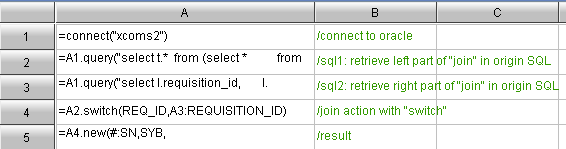
The esProc approach for resolution of this issue is as following:
1. Split the data set SQL of the report
As previously mentioned, the join between the two sub queries is causing the slow running of the SQL. We use esProc to execute the SQL for two sub queries, and then complete the association in esProc with “switch” (“switch” or “join” is used accordingly) statement. After test run we find significant improvement on efficiency.
esProc


2. Eliminate inter-cell computing from the report
The inter-cell computing (ratios and sum) part in the original report template is moved into esProc, thus the report generation could be speed up due to the removal of grid scanning.

3. Return the result set to the report all together
After all data preparation is done through esProc, the result will be returned to reporting tool all together. Once data source is received, the presentation will be done directly, without any computation (such as inter-cell computing) that might affect efficiency.


The complete codes for esProc are as following:


Solution Result

Through the above process, total report presentation time is radically reduced from the original 6 minutes 42 seconds to 57seconds - less than 1 minute. The benefit of this optimization is remarkable. This is what the end-user is happy to see.

Conclusion

In the process of the problem resolution, we found that the main query a and view ve in the original SQL statement requires only 10 to 40 seconds when executed in Oracle separately. However, a join between a and view ve requires several minutes. This is because Oracle cannot always find a reasonable approach when automatic execution plan is used. If human interference is required, it will be very tedious and time consuming.

esProc could improve the performance, because we know that ve is actually a dimensional table of a. Thus we can use a particular method of “switch”. This allows human definition of the execution plan for complicated query. In combination with Oracle’s basic query statement, it will speed up the process significantly.

2014年4月1日星期二

Solving the Cross Database Computation Issue in Reporting Data Source

Recently a development team met some difficulties in data source computation when developing iReport reports. After the use of esProc for cross database computation, the problem is resolved.
         
This is a project payment progress report, as part of a project management system. It’s based on an Oracle database. The reports needs to present the project name, payment amount, contract value, payment progress (in percentage), and name of the project manager, etc., for all ongoing projects. Amount these the first 3 items contributes to the difficulties met by the development team.
         
Note that the project payment record is stored in accounting system, rather than the Oracle database used by the development team. The accounting system is built on MSSQL database. The contract value information is also stored in a separate MSSQL database, used by contract management system. After analysis to the database, the project information record has an one-to-many relationship with payment record, and an one-to-one relationship with contract information.
         
By simplifying the table and fields other than the hardest part of the problem, the issue can then be described as: we need to join table projectpayProcess and contract from three heterogeneous databases. 
         Main fields from project include: projectNo, projectName.
         Main fields from payProcess include: payID, projectNo, amount.
         Main fields from contract include: contractNo, projectNo, conAmount.

It’s fairly easy to write the SQL statements if the three tables are in the same database. However they now belong to three heterogeneous databases, the join is then difficult. Meanwhile, the two MSSQL databases are used by two independent commercial software, which the development team can load data from, but not able to modify or administrate. This adds to the difficulty of the development. Although iReport support simple cross database computation with two tables, it’s very difficult to do this with three tables. The development team can not leverage iReport to meet this requirement.
         
The use of new reporting tool that supports multiple data sources might help. However as iReport is the only one used in the development process so far, a sudden change is not realistic. iReport supports user-defined JavaBean as data source, this can also be used to handle cross database computation. But JAVA is not a language for computation. The “join” computation between multiple sets requires a lot of coding. The workload makes it a non-sense. ETL tool is also a possible way to consolidate tables from multiple databases into one. The ETL approach normally requires incremental update to databases, which means timestamp and triggers need to be used in payProcess and contract table. As we know, commercial software does not allow databases to be modified in this way. ETL cannot provide the real time updates required for payment progress monitoring, which means it’s not suitable for this report.
         
Under such condition, the use of esProc for cross database computation is a handy approach. Here are the codes

         A1, A2, A3 are for loading data from different databases, which are native syntax for each database. Note the difference in SQL for each heterogeneous database.
         A4 is an association statement. From here on the syntax has nothing to do with certain database. The “join” function associate A1, A2, A3 according to projectID. Note that this is inner join. If it’s left join, the syntax of “join@1” should be used, whereas for full join, the syntax is “join@f”.
         A5 is to output the required fields from the join, which could be part or all fields from A1, A2 and A3.
         The statement of result A5 means to output the computation result by JDBC, so that iReport could rerieve them directly through JDBC. It’s also possible for esProc to be used in JAVA codes directly by means of JDBC call.
         The above codes are just a prototype, which can actually run successfully. In reality more table association and data fields need to be added, plus some and parameter filters.

As we could see, the solving of cross database computing issue with esProc is fairly easy. esProc supports JAVA well, and is handy to be used with iReport.