显示标签为“database”的博文。显示所有博文

2014年7月29日星期二

Configuration for esProc’s Access to Databases

esProc supports multiple heterogenous data sources, one of which is database. We’ll illustrate how esProc access databases with a few examples.

esProc can connect to database's jdbc driver, or to a database through jdbc-odbc bridge. Because of the problem of copyright, programmers who use esProc need to prepare jdbc or odbc driver of a database by themselves. When jdbc jar package driver is prepared, it need to be put into /common/jdbc of esProc's IDE installation directory, e.g., the directory C:\Program Files (x86)\MicroInsight\common\jdbc.

ODBC interface configuration of esProc's integrated development environment is as follows:


esProc's integrated development environment provides jdbc configure prompts of multiple databases, including SQL server, Oracle, DB2, Sybase, Access, mysql, hsql, teradata, postgres, etc. If the database waiting to be connected doesn't fall into the list, it can be added with other type. The interface configuration is as follows:
 

After the jar package driver is prepared and configuration is finished, the database will be conveniently connected within IDE and table data will be fetched:
 

In the above figure, cell A1 is connected to a hsql database named demo. Cell A2 uses SQL statement to query the table of employee information, and stores the table in this cell, which is a variable, as esProc's table sequence; arg1 is an input parameter. Cell A3 closes database connection. Cell A4 returns the query result outwards. The red box in the esProc IDE's bottom right corner displays demo's table name and field name, which is convenient for programmers to write SQL statement.

As the other functions provided by esProc, query function contains options and parameters. Take the expression query@1("select * from employee") as an example, @1 represents that 1 option is used, and by looking up the function reference, only the first record fetched by SQL statement will be returned. There are parameters in the parentheses. In the above figure, there is only a string of SQL statement and no other parameters in the parentheses, which shows that all other parameters have been set by default.

The cellset in the above figure can be integrated in Java application, and, acting as an esProc jdbc driver, it could be called by Java program . Steps include:
1. Prepare dfx file.
Save esProc program as test.dfx.

2. Deploy esProc jars . 
Putnecessary jars for calling esProc program in classpath of Java application. They could be put in WEB-INF/lib directory for a web application. These jars are located in the esProc IDE’s installation directory \esProc\lib, which includes:
    dm.jar esProc computing engine and JDBC driver
    poi-3.7-20101029.jar process reading and writing of Excel
    log4j_128.jar process logs
    icu4j_3_4_5.jar process internationalization
    dom4j-1.6.1.jar analyze configuration

3. Deploy database drvier jar .
Put database jdbc drivers needed for esProc to connect to the database in Java application's class path. For instance, hsql.jar of demo database.

4. Configure dfxConfig.xml and config.xml files
Config.xml file contains basic configuration information for esProc, such as registration code, address search path, master directory, configuration of data sources. They can be found in directory esProc\config in esProc's installation path, in which the information is the same as that set in the esProc's option page. dfxConfig.xml can be found in directory esProc\classes in installation path. In this article, we’ll illustrate some of the configuration for esProc to connect to a database. For the other, please see A Course of esProc.
1) Configuration method one: Directly configure connection parameters of database data source.
  Config.xml file:
    <DBList>
<!-- name of data source must be in consistent with that in dfx file -->
<DB name="demo">
    <property name="url" value="jdbc:hsqldb:hsql://127.0.0.1/demo"/>
    <property name="driver" value="org.hsqldb.jdbcDriver"/>
    <property name="type" value="HSQL"/>
    <property name="user" value="sa"/>
    <property name="password" value=""/>
    <property name="batchSize" value="1000"/>
    <!--
    Automatically connect or not. If the setting is true, db.query() function can be directly used to access a database; if it is false, the database cannot be automatically connected and connect(db) statement must be used for connection before db.query() function does its job.
    -->
    <property name="autoConnect" value="true"/>
    <property name="useSchema" value="false"/>
    <property name="addTilde" value="false"/>
     </DB>
     </DBList>
2)Configuration method two: Configure connection pool and jndi in Java application, and designate name of jndi in dfxConfig.xml file.
dfxConfig.xml file:
    <jndi-ds-configs>
<!--jndi prefix -->
<jndi-prefix>java:comp/env</jndi-prefix>
<!-- name of data source must be in consistent with that in dfx file -->
<jndi-ds-config>
<name>demo</name>
<dbType>HSQL</dbType>
<dbCharset>ISO-8859-1</dbCharset>
<clientCharset>ISO-8859-1</clientCharset>
<needTranContent>false</needTranContent>
<needTranSentence>false</needTranSentence>
<!--
Automatically connect or not. If the setting is true, db.query() function can be directly used to access a database; if it is false, the database cannot be automatically connected and connect(db) statement must be used for connection before db.query() function does its job.
-->
<autoConnect>true</autoConnect>
</jndi-ds-config>
     </jndi-ds-configs>

Please note that:
Name of configuration files must be config.xml and dfxConfig.xml and cannot be changed.
Reentering is forbidden and esProc JDBC itself cannot be used as a data source and configured as a database connection.
If the two configurations have the data sources of the same name, the data source in config.xml will prevail.

5. Deploy dfxConfig.xml, config.xml and test.dfx files. 
Put dfxConfig.xml and config.xml files in classpath of Java application, or directly package them into dm.jar.
Put test.dfx file in classpath of Java application, or put it in the absolute path designated by <paths/> node of dfxConfig.xml file.

6. Call test.dfx in java program.
If ...?config=... is used in connecting string of esProc JDBC, configuration of .xml will be used and that of config.xml will be ignored. Default setting will be enabled if there is no config parameter in connecting string.
For instance, configuration of myconfig.xml is used in the expression con= DriverManager.getConnection("jdbc:esproc:local://?config=myconfig.xml") .
Code sample is as follows:
    publicvoid testDataServer(){
Connection con = null;
com.esproc.jdbc.InternalCStatementst;
com.esproc.jdbc.InternalCStatement st2;
try{
// establish connection
Class.forName("com.esproc.jdbc.InternalDriver");
con= DriverManager.getConnection("jdbc:esproc:local://");
//call the stored procedure, in which test is the file name of dfx
st =(com.esproc.jdbc.InternalCStatement)con.prepareCall("call test(?)");
//set parameters
st.setObject(1,"3");
//the following statement has the same effect as that of the previous call
st =(com.esproc.jdbc.InternalCStatement)con.prepareCall("call test(3)");
//execute the stored procedure
st.execute();
//get result set
ResultSet set = st.getResultSet();
}
catch(Exception e){
System.out.println(e);
}
finally{
//close connection
if (con!=null) {
try {
con.close();
}
catch(Exception e) {
System.out.println(e);
}
}
}
    }

Database Operations with esProc

esProc can retrieve data from databases, write data to them and call databases’ stored procedures. Based on the three basic operations, esProc is well suited to many tasks relating to databases.

1. The process of data analysis and task presentation is:
a. Retrieve data from a database through SQL or stored procedures.
b. Get data from other sources (other databases, texts, hdfs, nosql databases, http data sources, json data sources, etc).
c. Process heterogeneous data uniformly.
d. Provide data for application programs or present data with report forms.

2. Tasks processed in batches that are similar to ETL
The process is similar to task analysis and presentation. Their difference is that data of the last operation is not used for presentation, but is written to other databases or other data sources.

3. Modify the current database in batches
One way is to retrieve data from the current database, process them and write them back to the database; the other is to directly process data of the database through SQL or stored procedures.

Now let’s look at in detail some examples of the three basic operations.
A.Retrieve data from databases. 
 

In the above figure, cell A1 has connected to a hsql database named demo. Cell A2 uses SQL statements to query table employee, which is stored in this cell, a variable, as esProc's table sequence; arg1 is a parameter from outside. Cell A3 closes database connection. Cell A4 returns query results outward. In order to make it easier for programmers to write SQL statements, table name and field name of database demo are displayed in the red box in bottom right corner of esProc's integrated development environment.

B.Write data to databases.
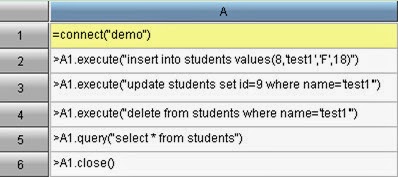
esProc can conveniently execute operations of add, delete and update, the simplest code is:
 
In the above table, insert, update and delete are respectively executed from A2 to A4. Execution of each SQL will be submitted automatically. Note that:
1. It is too frequent access to a database that three SQL statements are submitted three times.
2. There exists no transaction relation between the three SQL statements. So, if the execution of one SQL statement fails, the previous SQL statement remains unaffected.

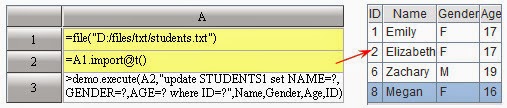
esProc can update in batches by directly using table sequences. For example: import students’ information from students.txt to update table students1 in the database. Since there are a lot of records to be modified, submitting transactions in batches is more reasonable.
 
A1:Define a file object in which students’ information is saved.
A2:Import file content.
A3:Use students’ information in A2 to update table students1 in batches. Here submitting SQL in batches can avoid accessing the database too frequently. Meanwhile, this can ensure data consistency, that is, simultaneous success or fail of writing the whole batch of data to the database.

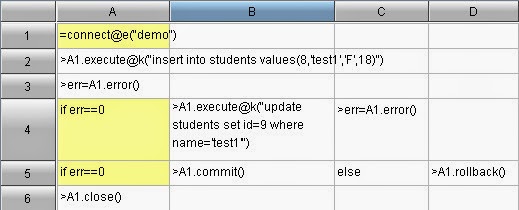
esProc can aslo deal with the complete database transaction consisting of multiple SQL statements. For example, we’ll add a new student, the student’s id should be modified to 9 after data are inserted. In order to ensure data consistency, submission must be executed after the insertion and modification are proved to be successful. Otherwise rollback should be executed.


A1:Connect to the database. Note that connect function has used @e option and the subsequent code will return error message when something wrong happens. If the option is not used, the database will terminate esProc program immediately when errors occur.
A2:Execute the insert SQL statement. Note that execute function uses @k option, meaning the transaction will not be submitted automatically after it is executed. If the option is not used, the insert SQL statement will be submitted immediately.
A3:Get the result of last operation in the database, i.e., the insert statement. If err variable is zero, the execution is successful; otherwise, err is the error code.
A4:Judging whether err variable, the execution result, is zero. If the answer is yes, the last operation of the insert statement is successful and modification in B4 can be executed.
C4:Get execution result of update SQL.
A5:Make judgment over variable err. If it is zero, submit the database; otherwise execute rollback.
A6:Close database connection.

C.Call stored procedures

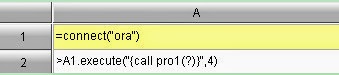
For stored procedures that don’t return parameters, esProc's method of calling them is simple:
 
A1:Connect the database.
A2:Call the stored procedure, value of output parameter is 4.

esProc call stored procedures with result sets in this way:
 
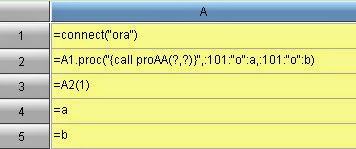
Cell A2 uses proc function to call the stored procedure: orac.proc("{call proAA(?,?)}",:101:"o":a,:101:"o":b). It returns two result sets (table sequences) to form a sequence, i.e., a set of table sequence, which assigns value to A1. The following is to explain proc function’s input parameters one by one.
1) SQL strings
"{call proAA(?,?)}" contains name of the stored procedure to be called, the question marks represent SQL's parameters.
2) Output parameter 1
:101:"o":a defines an output parameter in which 101 represents that its data type is cursor ( for other types, please see appendix) and ”o” represents that it is an output parameter. a defines a variable by which returned results can be referenced.
3) Output parameter 2
:101:"o":b defines an output parameter in which 101 represents that that its data type is cursor and "o" represents that it is an output parameter. b defines a variable by which returned results can be referenced.
Cell A3 returns cell A2's first table sequence (table emp's result set).
Cell A4 and A5 use output variables a and b respectively in A2 to get the execution results corresponding to the stored procedure. a corresponds to data of table emp and assigns value to A3; b corresponds to data of table test and assigns value to A4.

Appendix: Definition of Parameter Type
Values of type are:
public final static byte DT_DEFAULT = (byte) 0; // by default, identify automatically
public final static byte DT_INT = (byte) 1;
public final static byte DT_LONG = (byte) 2;
public final static byte DT_SHORT = (byte) 3;
public final static byte DT_BIGINT = (byte) 4;
public final static byte DT_FLOAT = (byte) 5;
public final static byte DT_DOUBLE = (byte) 6;
public final static byte DT_DECIMAL = (byte) 7;
        public final static byte DT_DATE = (byte) 8;
public final static byte DT_TIME = (byte) 9;
public final static byte DT_DATETIME = (byte) 10;
public final static byte DT_STRING = (byte) 11;
public final static byte DT_BOOLEAN = (byte) 12;

public final static byte DT_INT_ARR = (byte) 51;
public final static byte DT_LONG_ARR = (byte) 52;
Publicfinal static byte DT_SHORT_ARR = (byte) 53;
public final static byte DT_BIGINT_ARR = (byte) 54;
public final static byte DT_FLOAT_ARR = (byte) 55;
public final static byte DT_DOUBLE_ARR = (byte) 56;
public final static byte DT_DECIMAL_ARR = (byte) 57;

public final static byte DT_DATE_ARR = (byte) 58;
public final static byte DT_TIME_ARR = (byte) 59;
public final static byte DT_DATETIME_ARR = (byte) 60;
public final static byte DT_STRING_ARR = (byte) 61;
public final static byte DT_BYTE_ARR = (byte) 62;
public final static byte DT_CURSOR = (byte) 101;
public final static byte DT_AUTOINCREMENT = (byte) 102;

2014年7月27日星期日

Control of Database Connection in esProc

In handling database transactions, some operations may cause errors, which may bring about unpredictable results, especially in batch processing. In order to avoid this situation, database connection should be under control and error messages should be handled appropriately.

1. Database error messages
Let’s study database error messages first. Use an Access file DbCon.accdb as the target database, and create an ODBC data source in esProc. Use data of the file directly and write a connection string in the ODBC data source:DRIVER=Microsoft Access Driver (*.mdb, *.accdb);DBQ=D:\\files\\DbCon.accdb:


An empty table CityBak was created in the Access file DbCon.accdb:

 
In the table, ID is the primary key, and especially, data of POPULATION should be>1000000.

Now prepare to write CITIES' data in database demo to table CityBak:  


A1 gets table CITIES’s data from database demo:
 

A2 connects to database DbCon. A3 gets data from table CityBak; since it is a newly-created table, there are no records in it. 
 

An error occurs in A4. Because of the criterion POPULATION>1000000, the execution of writing the tenth record of Detroit's information to the database fails. By default, the execution will be terminated when errors occur in database operations. 
But we can look up the data-writing result in another dfx:

Query results of A2 are as follows: 
 
It can be seen that some of the data has been written to the target table successfully though the execution of program in the first cellset failed due to data constraint in table CityBak
Once database errors occur while updating a database in batches,program will be terminated. In order to avoid this situation, @e option can be used at the beginning of connecting to handle the errors manually while the connection remains. For example:

@e option is used in A2 when the database connection is established, so the code can respond manually to possible errors. In order to keep consistent with the preceding query results, the existing records in table CityBak should be emptied in A2 first. Thus query results of A5 will be the same with the preceding ones:


Because there were operations disagreeing with data constraint when updating table CityBak's data in A4, error code can be found in B4:
 
It should be noted that once database errors occur while batch updating a database, the updating will stop and errors will be recorded. By modifying the expression in A4 to =A2.error@m(), we can see the error messages:


We'll make further study: 


Using @a option indb.update@a() can empty database table before updating, then it is unnecessary to add statements to delete records. Get the first 5 records in A3 and write them to CityBak. Now since all the records satisfy the data constraint, the statements execution in A3 goes well and the error code in B3 is zero:
 
In A5, the records are stored successfully: 

2.Control of submission and rollback
We cannot know beforehand whether the batch update of records is successfully completed or not, and which records may go wrong. By default, each record’s update will be automatically submitted, which makes the results unpredictable. This is far from ideal for database management. 

In handling database transactions, sometimes we need to decide whether we should submit the update to the database or cancel the execution, as appropriate. In this circumstance, we use db.commit() and db.rollback() to take control.

The executed statements in esProc are by default submitted automatically and thus,out of control. If we want to use db.commit() and db.rollback() to control the submission, @k option is needed in executing statements to make code has control of the submission. In this way, we can decide if the data are eligible in the light of error messages. In the following example, all data become ineligible if there is something wrong with the batch update. This can prevent unpredictable results in the database:

A3 empties table CityBak and executes submission automatically because it didn't use @k option when executing db.execute()

Errors may occur in A4 when executing batch update, which can be seen in A5's computed result: 
 
Therefore, rollback in B6 will be executed and data won’t be written to the database. Query results of A7 are as follows: 
 
We can see according to error code that all goes well when executing batch update with @k option, like the executed statements in A8. Value of A9 is: 
 
Now submission in B9 will be executed and data will be written to the database. Query results of A11 are as follows: